





In today’s competitive job market, having an ATS-friendly resume is essential. An ATS (Applicant Tracking System) is a software program that screens resumes and selects the most qualified candidates for a job. To ensure your resume stands out and reaches the hiring manager’s desk, it’s crucial to optimize it for ATS compatibility.
Step 1: Craft a Captivating Resume Summary
Your resume summary is a concise, attention-grabbing statement that highlights your most relevant skills, experience, and career goals. It’s the first thing a hiring manager will read, so it’s important to make it impactful. Keep it brief, around 2-3 sentences, and tailor it to each job you apply for.
Step 2: Highlight Your Skills and Experience
In the skills section, list your technical and soft skills in a clear and easy-to-read format. Use keywords from the job description to make it ATS-friendly. In the experience section, provide detailed descriptions of your work history, including your responsibilities, accomplishments, and the results you achieved. Use action verbs and quantify your results whenever possible.
Step 3: Quantify Accomplishments for Impact
Whenever possible, use numbers and metrics to quantify your accomplishments. This makes your resume more impactful and demonstrates your value to potential employers. For example, instead of saying “Managed a team of engineers,” you could say “Managed a team of 10 engineers, resulting in a 20% increase in productivity.”
Step 4: Tailor Your Resume to Each Job Description
Don’t use a one-size-fits-all resume. Instead, tailor your resume to each job you apply for. Read the job description carefully and identify the keywords and skills that are most relevant. Then, make sure to include those keywords in your resume.
Step 5: Proofread Carefully for Grammatical Errors
Grammatical errors can make your resume look unprofessional and could cost you an interview. Before you submit your resume, proofread it carefully for any errors in grammar, spelling, and punctuation. You can also use a grammar checker to ensure that your resume is error-free.
Step 6: Format for ATS Compatibility
To ensure your resume is ATS-friendly, use a simple, clean format with clear headings and bullet points. Avoid using fancy fonts or graphics, as ATS systems may not be able to read them correctly. Use standard font sizes and margins, and make sure your resume is easy to navigate.
Step 7: Export Your Professional Resume in PDF
When exporting your resume, choose the PDF format to ensure that it retains its formatting and appearance. PDF format is widely accepted by ATS systems and will ensure that your resume looks the same on any device.
By following these steps, you can create an ATS-friendly resume that will make you stand out in the job market. Remember to tailor your resume to each job you apply for, proofread it carefully, and export it in PDF format. With a strong resume, you’ll be well on your way to landing your dream job.
For additional support, consider using a professional resume builder like ResumeGemini. ResumeGemini offers premium, ATS-friendly resume templates and step-by-step guidance to help you create a resume that will make you irresistible to hiring managers.
Career Expert Tips:
- Select the ideal resume template to showcase your professional experience effectively.
- Master the art of resume writing to highlight your unique qualifications and achievements.
- Checkout the resume writing tips for guidance and best practices.
- Make your 2025 brighter with a new job. Build a powerful resume with ResumeGemini and save big, enjoy exclusive discounts on premium templates.
Frequently Asked Questions (FAQ’s)
What are ATS-friendly resume formats?
ATS-friendly resume formats are designed to be easily parsed by Applicant Tracking Systems (ATS). These systems use algorithms to scan resumes for keywords and other relevant information. To make your resume ATS-friendly, use a simple, clean format with clear headings and subheadings. Avoid using graphics, images, or tables, as these can confuse the ATS. Use a standard font such as Arial, Calibri, or Times New Roman, and keep your font size between 10 and 12 points.
- Use a simple, clean format with clear headings and subheadings.
- Avoid using graphics, images, or tables.
- Use a standard font such as Arial, Calibri, or Times New Roman.
How do I write a resume that stands out in a competitive job market?
To write a resume that stands out in a competitive job market, focus on highlighting your skills and experience that are relevant to the position you are applying for. Use keywords from the job description in your resume, and tailor your resume to each job you apply for. Quantify your accomplishments whenever possible, using specific numbers and metrics to demonstrate your impact. Proofread your resume carefully before submitting it, and consider getting feedback from a friend or family member.
- Focus on highlighting your skills and experience that are relevant to the position you are applying for.
- Use keywords from the job description in your resume.
- Quantify your accomplishments whenever possible.
- Proofread your resume carefully before submitting it.
What are the most common mistakes to avoid when writing a resume?
Some of the most common mistakes to avoid when writing a resume include:
- Using a generic template that doesn’t highlight your unique skills and experience.
- Including irrelevant information or personal details.
- Making grammatical errors or typos.
- Using a cluttered or difficult-to-read font.
- Not tailoring your resume to each job you apply for.
How long should my resume be?
The ideal length for a resume is one page. However, if you have a lot of relevant experience, you may need to use two pages. If your resume is too long, it may be difficult for the hiring manager to read and digest all of the information. Conversely, if your resume is too short, it may not provide enough detail about your skills and experience.
- The ideal length for a resume is one page.
- If you have a lot of relevant experience, you may need to use two pages.
- If your resume is too long, it may be difficult for the hiring manager to read and digest all of the information.
- If your resume is too short, it may not provide enough detail about your skills and experience.
How do I tailor my resume to different job descriptions?
To tailor your resume to different job descriptions, focus on highlighting the skills and experience that are most relevant to the position you are applying for. Use keywords from the job description in your resume, and be sure to highlight your accomplishments that are most relevant to the job. You may also want to consider using a different resume template for each job you apply for, depending on the industry and the type of position you are applying for.
- Focus on highlighting the skills and experience that are most relevant to the position you are applying for.
- Use keywords from the job description in your resume.
- Be sure to highlight your accomplishments that are most relevant to the job.
- Consider using a different resume template for each job you apply for, depending on the industry and the type of position you are applying for.
What is the best way to highlight my skills and experience?
The best way to highlight your skills and experience is to use specific examples and quantifiable results. For example, instead of simply stating that you are a “skilled project manager,” you could say that you “managed a team of 10 engineers to deliver a software product on time and under budget.” This will give the hiring manager a better understanding of your skills and experience, and will help you stand out from the competition.
- Use specific examples and quantifiable results.
- Instead of simply stating that you are a “skilled project manager,” you could say that you “managed a team of 10 engineers to deliver a software product on time and under budget.”
How do I optimize my resume for keywords?
To optimize your resume for keywords, use relevant keywords from the job description in your resume. You can also use industry-specific keywords that are relevant to the position you are applying for. Be sure to use keywords naturally throughout your resume, and avoid keyword stuffing.
- Use relevant keywords from the job description in your resume.
- You can also use industry-specific keywords that are relevant to the position you are applying for.
- Be sure to use keywords naturally throughout your resume.
- Avoid keyword stuffing.
Next Step:
Equip yourself with the latest resume-writing strategies for 2026 and optimize your resume to stand out in the competitive job market. ResumeGemini offers premium, ATS-friendly, customizable resume templates with over 3.6 million content examples. It provides a step-by-step process to help users create a resume, with tips on what to include in each section. Create a standout resume today and kickstart your job search journey!
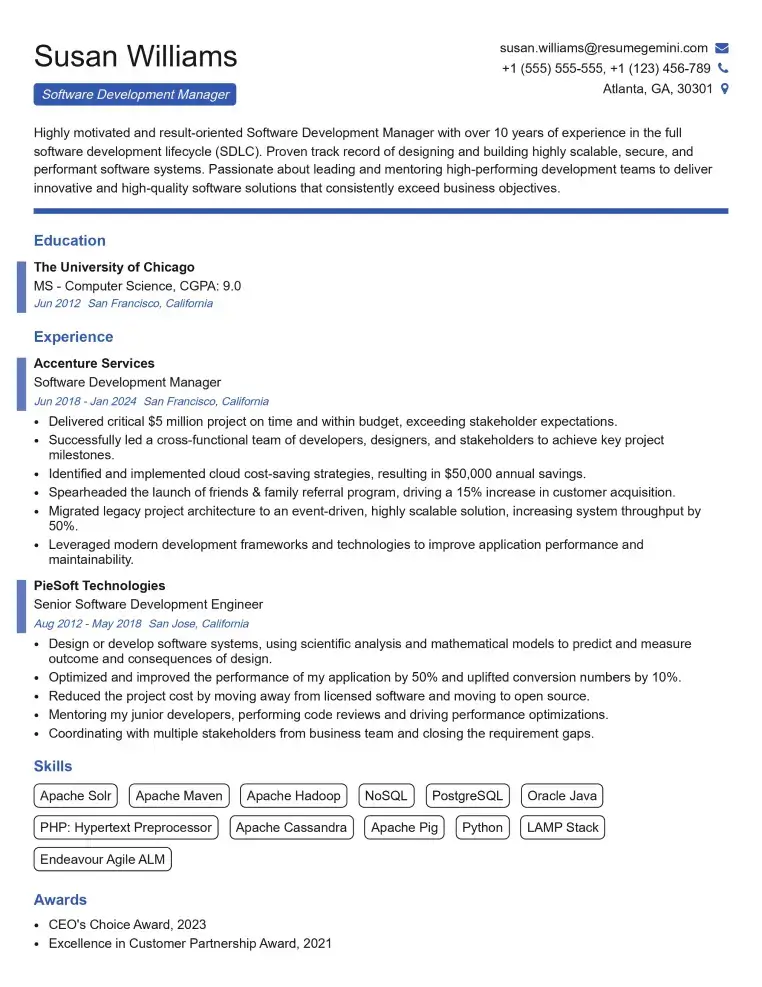
Elevate your job search with our premium resume templates. Here is an amazing resume template that can be used to build a professional and elegant resume. You can build a resume from scratch or revamp your existing resume. Impress hiring managers and secure your next opportunity.
- Top 50 Most Common Interview Questions
- The Psychology of a Great Resume: Hacks to Impress Recruiters
- What Mistakes to Avoid When Writing a Resume: A Comprehensive Guide
- Elevate Your Career with Expert Resume Building: Introducing ResumeGemini
- How to Write a Resume Using Google Gemini: Step-by-Step Guide