





In today’s competitive job market, your resume is your ticket to landing your dream job. But with applicant tracking systems (ATS) scanning resumes before they reach human eyes, it’s crucial to ensure your resume is ATS-friendly to make it through the first round of screening.
1. Why ATS-Friendly Templates are Crucial for Modern Job Seekers
Applicant tracking systems (ATS) are software used by many companies to automate the resume screening process. These systems scan resumes for specific keywords and phrases related to the job description. If your resume doesn’t contain the right keywords, it may be overlooked by the ATS, and you’ll never get a chance to impress the hiring manager.
2. How to Choose the Perfect Template for Your Industry and Role
Not all ATS-friendly templates are created equal. Some templates are better suited for certain industries or roles than others. When choosing a template, consider the following factors:
- Industry: Different industries have different resume conventions. For example, resumes in the finance industry tend to be more formal than resumes in the creative industry.
- Role: The level of seniority and the specific role you’re applying for can also influence the best template choice. For example, a resume for an entry-level position may be more concise than a resume for a senior-level position.
3. Expert Tips for Optimizing Your Resume for ATS Scans
In addition to choosing the right template, there are several other things you can do to optimize your resume for ATS scans:
- Use keywords: Identify the most important keywords in the job description and incorporate them throughout your resume, especially in your skills section.
- Use a clean, easy-to-read font: Sans-serif fonts like Arial, Helvetica, and Calibri are easier for ATS to read than serif fonts like Times New Roman.
- Avoid using fancy formatting: ATS can have difficulty parsing resumes with complex formatting, such as tables, columns, and graphics.
- Keep your resume concise: Most ATS have a limit on the number of characters or pages they can scan. Keep your resume to one or two pages, and focus on including only the most relevant information.
4. Customizable Sections to Tailor Your Resume to Specific Jobs
One of the best things about using a resume builder like ResumeGemini is that you can easily customize your resume to fit the specific job you’re applying for. With ResumeGemini, you can add or remove sections, change the order of sections, and even add custom fields to highlight your unique skills and experience.
5. Preview and Personalize Your Resume with Ease
Once you’ve created your resume, it’s important to preview it before you download it. This will help you catch any errors and make sure your resume looks its best. With ResumeGemini, you can preview your resume in both PDF and HTML formats. You can also personalize your resume by adding your own logo, photo, and contact information.
6. Additional Options for a Professional and Standout Resume
In addition to the basic features mentioned above, ResumeGemini also offers a number of additional options to help you create a professional and standout resume:
- 45,000+ pre-built resume samples: Browse a library of professionally written resume samples for different job titles and industries.
- 12 unique templates: Choose from a variety of professionally designed templates to find the perfect fit for your style and industry.
- 60 unique template options: Each template comes in 5 different color themes, giving you a total of 60 unique template options to choose from.
- One-time payment: No recurring charges or subscriptions. Pay once and use ResumeGemini for life.
7. How to Use Our Resume Builder to Create a Winning Resume
Creating a winning resume with ResumeGemini is easy. Simply follow these steps:
- Choose a template: Browse our library of templates and choose the one that best fits your industry and role.
- Add your information: Enter your contact information, work experience, education, and skills.
- Customize your resume: Add or remove sections, change the order of sections, and add custom fields to tailor your resume to the specific job you’re applying for.
- Preview and download your resume: Preview your resume in both PDF and HTML formats, and then download it in the format of your choice.
8. Success Stories: How Our Templates Helped Job Seekers Land Their Dream Jobs
Our resume templates have helped countless job seekers land their dream jobs. Here are just a few examples:
- “I used ResumeGemini to create a resume that landed me my first job out of college. I highly recommend their services to anyone who is looking for a professional and effective resume template.” – Emily, recent college graduate
- “I was struggling to get interviews with my old resume. I decided to try ResumeGemini, and I was immediately impressed with the quality of their templates. I landed a job within two weeks of using their services.” – John, experienced professional
- “I’ve used ResumeGemini to create resumes for both my job search and my clients. I’ve always been impressed with the results. Their templates are professional, easy to use, and they help me get noticed by potential employers.” – Mary, resume writer
Career Expert Tips:
- Select the ideal resume template to showcase your professional experience effectively.
- Master the art of resume writing to highlight your unique qualifications and achievements.
- Checkout the resume writing tips for guidance and best practices.
- Make your 2025 brighter with a new job. Build a powerful resume with ResumeGemini and save big, enjoy exclusive discounts on premium templates.
Frequently Asked Questions (FAQs)
What is an ATS-friendly resume template?
An Applicant Tracking System (ATS) is a software used by recruiters to screen and filter job applications. ATS-friendly resume templates are specifically designed to be easily parsed and read by ATS software, increasing your chances of passing the initial screening process and landing an interview. These templates are structured and formatted in a way that allows the ATS to quickly extract and analyze key information from your resume, such as your skills, experience, and qualifications.
How do I choose the best resume template for my industry?
When selecting an ATS-friendly resume template, consider the industry you’re applying to and the specific job requirements. Different industries have varying norms and expectations, so it’s important to choose a template that aligns with the industry standards and showcases your skills and experience in a manner that resonates with potential employers.
Can I customize the templates to match my personal brand?
Absolutely! While ResumeGemini‘s templates provide a strong foundation, you can customize them to reflect your personal brand and career aspirations. You can add your own fonts, colors, and design elements to make your resume stand out and showcase your unique strengths.
How do I optimize my resume for ATS scans?
To optimize your resume for ATS scans, use relevant keywords throughout your resume that match the job description and industry. ATS software relies on keywords to identify qualified candidates, so incorporating industry-specific terminology and quantifying your accomplishments with specific metrics can significantly improve your chances of passing the initial screening process.
What are the additional sections I can add to my resume?
In addition to the standard sections like work experience, education, and skills, you can include additional sections to highlight your accomplishments, awards and recognition, volunteer experience, certifications, and language proficiency. These sections provide an opportunity to showcase your well-roundedness and demonstrate your commitment to professional development.
Can I preview my resume before downloading it?
Yes! ResumeGemini allows you to preview your resume before downloading it in PDF format. This allows you to make sure that your resume looks exactly the way you want it to and that all the information is accurate and up-to-date.
How much does it cost to use the resume builder?
ResumeGemini offers a one-time payment plan with no recurring charges. This means that you only pay once to access all of the templates, tools, and features the platform has to offer.
Do you offer any support or guidance during the resume-writing process?
Yes! ResumeGemini provides comprehensive support and guidance throughout the resume-writing process. You can access helpful articles, tutorials, and FAQs on the website, or reach out to their dedicated customer support team for assistance with specific questions or concerns.
Next Step:
Now that you have a better understanding of ATS-friendly resume templates and how to use them effectively, it’s time to take the next step in your job search journey. Head over to ResumeGemini today to explore our collection of 10 expertly designed ATS-friendly templates. With ResumeGemini, you can easily create a resume that stands out, showcases your skills, and lands you more interviews.
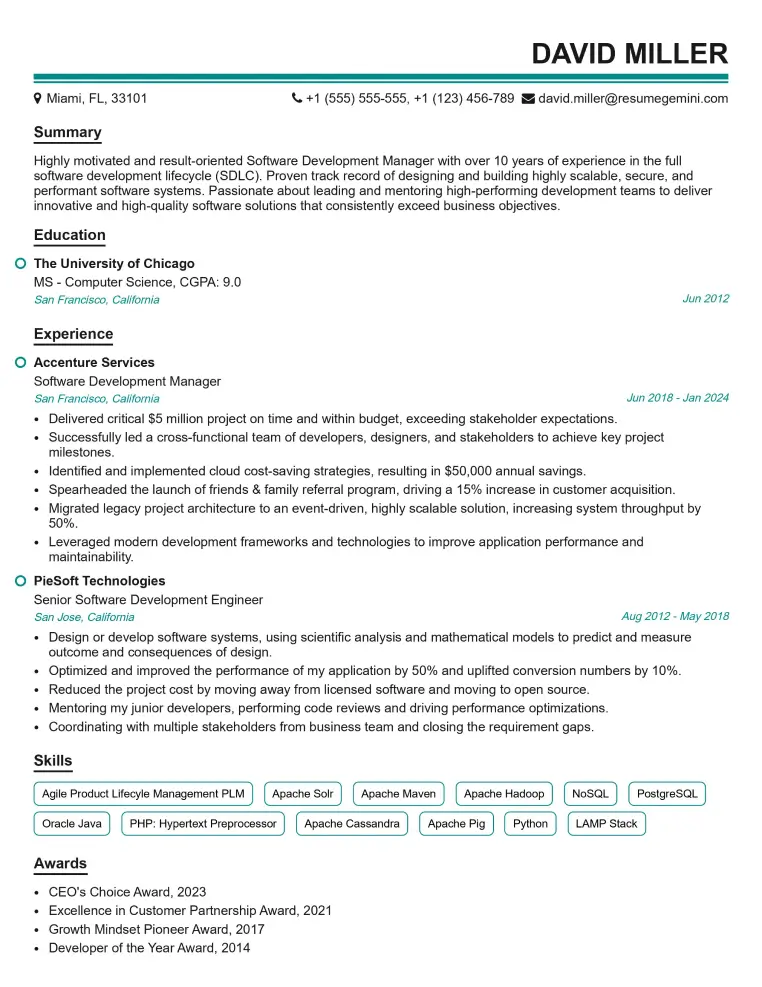
Elevate your job search with our premium resume templates. Here is an amazing resume template that can be used to build a professional and elegant resume. You can build a resume from scratch or revamp your existing resume. Impress hiring managers and secure your next opportunity.
- Top 50 Most Common Interview Questions
- The Psychology of a Great Resume: Hacks to Impress Recruiters
- What Mistakes to Avoid When Writing a Resume: A Comprehensive Guide
- Elevate Your Career with Expert Resume Building: Introducing ResumeGemini
- Crafting Your First Impression: How To Make Free Resume Online For Freshers