





In today’s competitive job market, a well-written resume is more important than ever. It’s your chance to showcase your skills and experience, and make a lasting impression on potential employers. But what makes a resume stand out from the crowd? In this blog post, we’ll share our top 10 resume tips for 2026 success, empowering you to crush the competition and land your dream job.
Tailor Your Resume to Each Job Application
One of the most important resume tips is to tailor your resume to each job application. This means highlighting the skills and experience that are most relevant to the position you’re applying for. Take the time to read the job description carefully and identify the key requirements. Then, make sure your resume clearly demonstrates how you meet those requirements.
Quantify Your Accomplishments with Data
When possible, use data to quantify your accomplishments. This will help your resume stand out from the crowd and make your experience more tangible to potential employers. For example, instead of saying “Increased sales,” you could say “Increased sales by 15% over a six-month period.”
Highlight Skills and Experience Relevant to the Job
When highlighting your skills and experience, focus on the ones that are most relevant to the job you’re applying for. If you’re applying for a marketing position, for example, you’ll want to highlight your experience in marketing campaigns and social media management. Leave out any skills or experience that are not relevant to the position.
Use Strong Action Verbs and Power Words
Use strong action verbs and power words throughout your resume. This will help your resume sound more engaging and make your accomplishments stand out. For example, instead of saying “Managed a team,” you could say “Led a team of 10 to achieve record-breaking sales.”
Keep Your Resume Concise and Easy to Read
Your resume should be concise and easy to read. Employers typically spend only a few seconds scanning a resume, so it’s important to make sure that your information is easy to find and understand. Use a clear and concise font, and keep your resume to one page if possible.
Proofread Carefully for Errors
Proofread your resume carefully for any errors before submitting it. Typos and grammatical errors can make a bad impression on potential employers. Ask a friend or family member to proofread your resume as well.
Consider Using a Professional Resume Builder
If you’re not confident in your resume writing skills, consider using a professional resume builder, like ResumeGemini. Resume builders provide a variety of templates and tools to help you create a professional-looking resume that will stand out from the crowd.
Get Feedback from Trusted Sources
Once you’ve written your resume, get feedback from trusted sources, such as friends, family members, or a career counselor. They can provide valuable insights and help you identify any areas that need improvement.
Use a Consistent Design and Font
Use a consistent design and font throughout your resume. This will help your resume look professional and polished. Avoid using too many different fonts or colors.
Save Your Resume as a PDF
When you’re finished writing your resume, save it as a PDF. This will ensure that your resume looks the same on all devices.
Career Expert Tips:
- Select the ideal resume template to showcase your professional experience effectively.
- Master the art of resume writing to highlight your unique qualifications and achievements.
- Checkout the resume writing tips for guidance and best practices.
- Make your 2025 brighter with a new job. Build a powerful resume with ResumeGemini and save big, enjoy exclusive discounts on premium templates.
Frequently Asked Questions (FAQ’s)
What is the most important thing to include on my resume?
The most important thing to include on your resume is your contact information, including your name, address, phone number, and email address. You should also include a professional headshot, a summary of your skills and experience, and a list of your work history in reverse chronological order.
- Quantify your accomplishments with specific metrics.
- Use action verbs to describe your experience and skills.
- Tailor your resume to each job you apply for.
How long should my resume be?
Your resume should be one page long for every 10 years of experience. So, if you have 5 years of experience, your resume should be one page long. If you have 15 years of experience, your resume can be two pages long.
- Use a standard font size of 11 or 12 points.
- Use one-inch margins on all sides of your resume.
- Use white space to make your resume easy to read.
What is the best font to use for my resume?
The best font to use for your resume is a professional font that is easy to read. Some good choices include Times New Roman, Arial, and Helvetica. Avoid using fancy or decorative fonts that can be difficult to read.
- Use a font size of 11 or 12 points.
- Use a standard font color of black or blue.
- Avoid using italics, bold, or underlining unless necessary.
Should I include a photo on my resume?
Whether or not to include a photo on your resume is a personal decision. Some people believe that a photo can make you more memorable, while others believe that it can be distracting. If you do decide to include a photo, make sure it is a professional headshot that is taken against a plain background.
- Dress professionally and smile in your photo.
- Make sure your photo is high-quality and in focus.
- Crop your photo so that it is head and shoulders only.
Should I list my references on my resume?
It is not necessary to list your references on your resume. However, you should be prepared to provide them to potential employers upon request. If you do decide to list your references on your resume, make sure they are people who can speak to your skills and experience.
- Get permission from your references before listing them on your resume.
- Provide your references with a copy of your resume so that they can be prepared to answer questions about you.
- Thank your references for their support.
What are the most common resume mistakes to avoid?
Some of the most common resume mistakes include:
- Using a generic or outdated resume template.
- Including irrelevant or unnecessary information.
- Making typos or grammatical errors.
- Using a unprofessional font or design.
- Not tailoring your resume to each job you apply for.
How can I make my resume stand out from the competition?
There are a few things you can do to make your resume stand out from the competition:
- Use a professional resume template.
- Highlight your skills and experience in a clear and concise way.
- Use strong action verbs and quantify your accomplishments.
- Tailor your resume to each job you apply for.
- Get feedback on your resume from a friend, family member, or career counselor.
What are the key differences between a CV and a resume?
A CV (curriculum vitae) is a detailed document that lists your entire academic and professional history. A resume is a shorter document that highlights your most relevant skills and experience for a specific job.
- CVs are typically used for academic or research positions.
- Resumes are typically used for job applications in the private sector.
- CVs are typically longer than resumes.
- CVs include more detailed information about your education and research experience.
- Resumes focus on your most relevant skills and experience for a specific job.
Next Step:
Now that you know the answers to some of the most frequently asked questions about resumes, you can start creating your own resume. ResumeGemini can help you create a professional resume that will help you land your dream job. With our easy-to-use resume builder, you can create a resume in minutes. Simply enter your information, and our resume builder will create a professional resume that is tailored to your specific needs.
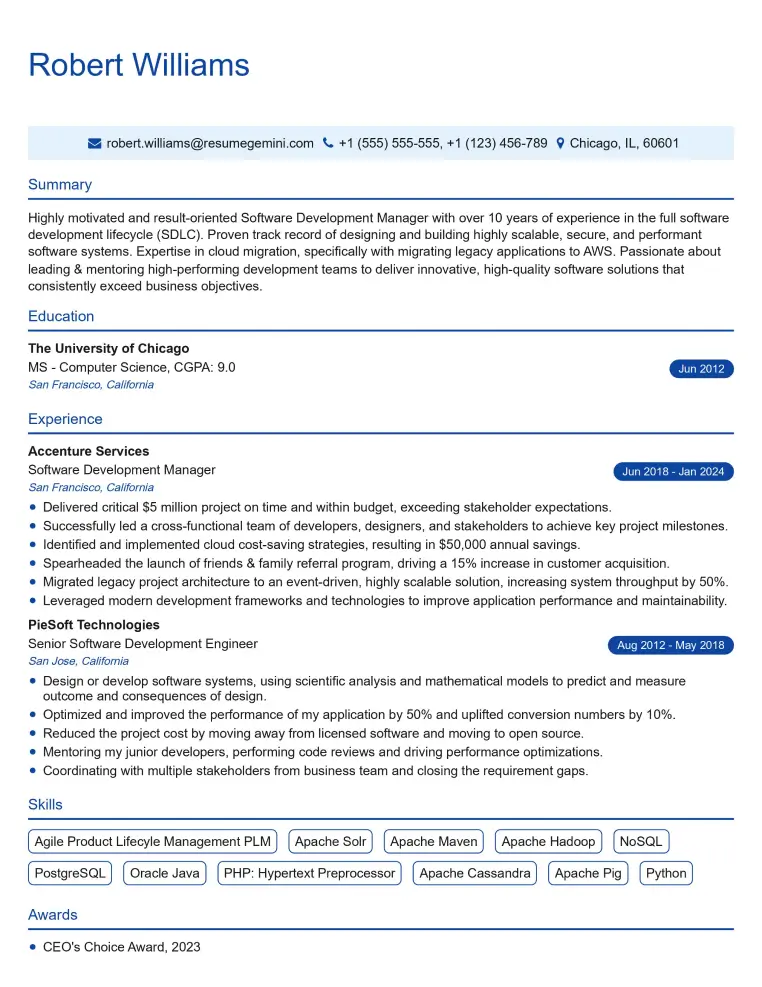
Elevate your job search with our premium resume templates. Here is an amazing resume template that can be used to build a professional and elegant resume. You can build a resume from scratch or revamp your existing resume. Impress hiring managers and secure your next opportunity.
- Top 50 Most Common Interview Questions
- The Psychology of a Great Resume: Hacks to Impress Recruiters
- What Mistakes to Avoid When Writing a Resume: A Comprehensive Guide
- Elevate Your Career with Expert Resume Building: Introducing ResumeGemini
- How to Write a Resume Using Google Gemini: Step-by-Step Guide