





In today’s competitive job market, it’s essential to have a resume that stands out and gets noticed by potential employers. But with Applicant Tracking Systems (ATS) filtering out resumes, creating an ATS-friendly resume is more important than ever.
Why ATS-Friendly Resume Templates Matter in 2026
An ATS-friendly resume is designed to be easily parsed by automated software, which allows it to be quickly and efficiently screened for keywords and relevant information. In 2026, it’s estimated that over 90% of Fortune 500 companies will be using ATS, making it crucial for job seekers to have resumes that are optimized for these systems.
25 Customizable Resume Templates Tailored for Different Industries
ResumeGemini offers a wide range of ATS-friendly resume templates specifically tailored for different industries, including:
- Technology and Engineering
- Healthcare and Pharmaceuticals
- Marketing and Sales
- Finance and Accounting
- Creative and Design
- Hospitality and Tourism
- Education and Non-Profit
Expert Tips for Optimizing Your Resume for ATS
- Use keywords relevant to the job you’re applying for. ATS scans resumes for specific keywords, so make sure to include relevant keywords in your resume.
- Use a reverse-chronological format. This format is the most ATS-friendly, as it lists your work experience in reverse chronological order, starting with your most recent job.
- Quantify your accomplishments. Whenever possible, use numbers to quantify your accomplishments and results. This will help ATS identify your skills and experience.
- Use clear and concise language. ATS cannot process complex or flowery language, so make sure your resume is written in clear and concise language.
- Proofread your resume carefully. There is nothing more important than proofreading, before final submission.
Additional Resume Sections to Showcase Your Skills and Experience
In addition to the standard resume sections, such as work experience and education, you can also include additional sections to showcase your skills and experience, such as:
- Awards and Accomplishments
- Certifications
- Languages
- Projects
- Extracurricular Activities
- References
Preview, Personalize, and Download Your Customized Resume
With ResumeGemini, you can easily preview, personalize, and download your customized resume. Simply choose a template, fill in your information, and preview your resume to see how it looks. You can then personalize your resume by adding your own design elements, such as fonts, colors, and images. Once you’re finished, simply download your resume as a PDF or Word document.
Stand Out from the Crowd with Professional and Eye-Catching Designs
ResumeGemini offers 12 unique templates with each template having 5 unique color themes effectively giving 60 unique template options. These professionally designed templates will help your resume stand out from the crowd and make a lasting impression on potential employers.
Career Expert Tips:
- Select the ideal resume template to showcase your professional experience effectively.
- Master the art of resume writing to highlight your unique qualifications and achievements.
- Checkout the resume writing tips for guidance and best practices.
- Make your 2025 brighter with a new job. Build a powerful resume with ResumeGemini and save big, enjoy exclusive discounts on premium templates.
Frequently Asked Questions (FAQs)
What is an ATS-friendly resume template?
An ATS-friendly resume template is designed to work seamlessly with Applicant Tracking Systems (ATS). ATS are software programs used by recruiters and hiring managers to filter and rank job applications. ATS-friendly resume templates are structured and formatted in a way that makes them easily readable by these systems, ensuring that your application is not overlooked. They typically adhere to specific formatting guidelines, such as using clear fonts, defined sections, and avoiding graphics or images that can interfere with the ATS parsing process.
How do I choose the right resume template for my industry?
Choosing the right resume template for your industry is crucial to tailor your application to the specific requirements of different sectors. Different industries often have unique resume conventions and norms. For example, a resume for a creative field like design or marketing may prioritize visual aesthetics and a portfolio, while a resume for a technical field like engineering or finance may emphasize technical skills and certifications. Consider researching industry-specific resume trends and selecting a template that aligns with the expectations of your target employers.
Can I customize the resume templates to match my personal style?
Yes, you can customize ResumeGemini’s resume templates to match your personal style and make them stand out. Our templates provide a solid foundation, but you have the flexibility to personalize them by adjusting fonts, colors, and design elements. You can highlight your unique skills and experience by incorporating relevant keywords and using action-oriented language. Remember, while customization is important, ensure that your resume remains ATS-friendly and easy to read.
What sections should I include on my resume to make it ATS-friendly?
To make your resume ATS-friendly, include essential sections that align with industry standards and ATS preferences. Typically, these sections include:
- Contact Information: Clearly display your name, address, phone number, email, and LinkedIn profile URL.
- Professional Summary: Craft a concise and compelling statement that summarizes your skills, experience, and career goals.
- Skills: List your hard and soft skills relevant to the positions you’re applying for, using industry-specific keywords.
- Work Experience: Describe your previous roles in reverse chronological order, highlighting your responsibilities, accomplishments, and quantifiable results.
- Education: List your educational qualifications, including degrees, certifications, and relevant coursework.
How can I preview my resume before downloading it?
ResumeGemini allows you to preview your resume before downloading it. This feature helps you check for any errors, formatting issues, or sections that need further refinement. You can also experiment with different templates and designs to find the one that best suits your needs. By previewing your resume, you can ensure that it is polished and ready to impress potential employers.
What makes ResumeGemini’s resume templates unique?
ResumeGemini offers a comprehensive suite of resume templates that are tailored to various industries and career levels. Our templates are designed to be ATS-friendly, ensuring that your application gets noticed by recruiters. With over 60 unique template options, you can find the perfect design that matches your personal style and professional goals. Additionally, our templates are customizable, allowing you to add your own flair and showcase your skills and experience in the best possible light.
How does ResumeGemini ensure that my resume is ATS-friendly?
ResumeGemini leverages advanced algorithms and industry best practices to ensure that your resume is ATS-friendly. Our templates are optimized for readability by applicant tracking systems, making it easier for recruiters to parse and rank your application. We provide clear guidance on formatting, font choices, and keyword optimization to help you create a resume that stands out in the digital screening process. By using our ATS-friendly templates and following our expert advice, you can increase the chances of your resume being shortlisted for further consideration.
Next Step:
Elevate your job search with ResumeGemini. Our ATS-friendly resume templates, vast resume sample library, and expert guidance will empower you to create a resume that captures the attention of recruiters and lands you the job you deserve. Take the first step towards your dream career today!
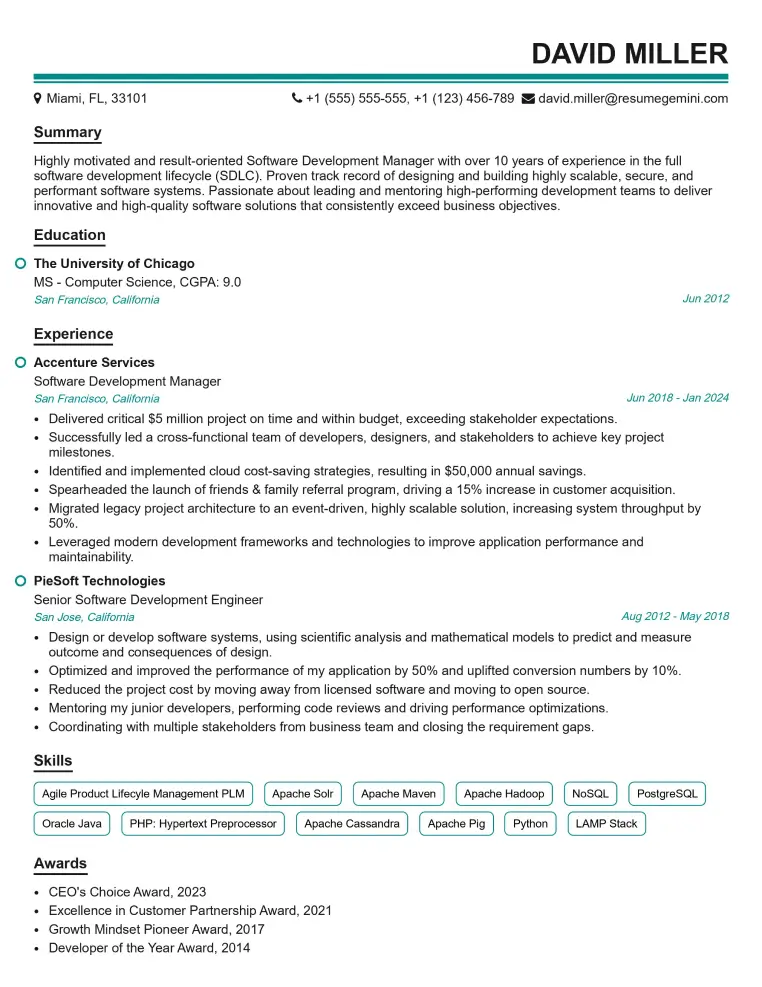
Elevate your job search with our premium resume templates. Here is an amazing resume template that can be used to build a professional and elegant resume. You can build a resume from scratch or revamp your existing resume. Impress hiring managers and secure your next opportunity.
- Top 50 Most Common Interview Questions
- The Psychology of a Great Resume: Hacks to Impress Recruiters
- What Mistakes to Avoid When Writing a Resume: A Comprehensive Guide
- Elevate Your Career with Expert Resume Building: Introducing ResumeGemini
- How to Write a Resume Using Google Gemini: Step-by-Step Guide