





In today’s competitive job market, creating a resume that stands out from the crowd is essential for landing your dream job. ATS-friendly resume templates are designed to do just that. With built-in formatting, keywords, and structure, they help your resume pass through Applicant Tracking Systems (ATSs) and land in the hands of hiring managers, increasing your chances of getting noticed.
Why ATS-friendly Resumes Are Essential
ATSs are software programs commonly used by companies to screen and sort resumes. They scan resumes for specific keywords, phrases, and formatting elements to identify candidates who meet the job requirements. If your resume doesn’t align with the criteria set by the ATS, it may be discarded, even if you’re a highly qualified candidate.
By using an ATS-friendly template, you can increase your chances of passing through the initial screening process. These templates are designed to meet the technical specifications of ATSs, ensuring that your resume is properly parsed and evaluated.
Key Features to Look for in an ATS-friendly Resume Template
- Clean and organized layout: ATSs prefer resumes with a clear and concise layout. Choose a template with a well-defined structure, including dedicated sections for your contact information, skills, experience, and education.
- Appropriate font and font size: ATSs require resumes to use common fonts and font sizes for optimal scanning. Stick to standard fonts like Times New Roman, Calibri, or Arial, and use font sizes between 10 and 12 points.
- Proper use of keywords: Research job descriptions and identify relevant keywords that hiring managers are looking for. Include these keywords naturally throughout your resume, but avoid keyword stuffing.
- Section headings and subheadings: Use clear section headings and subheadings to organize your resume, making it easier for ATSs to locate and process information.
- Concise and quantifiable content: ATSs prefer resumes that are concise and easy to skim. Use action verbs and quantify your accomplishments whenever possible to demonstrate the impact of your work.
Step-by-Step Guide to Customizing Your Resume Using Our Templates
Using ResumeGemini templates, you can easily customize your resume to match your skills and career objectives. Here’s a step-by-step guide:
- Choose a template: Browse our collection of ATS-friendly templates and select the one that best suits your style and industry.
- Enter your information: Fill in your contact details, education, skills, and experience in the designated sections.
- Highlight your most relevant skills: Review the job description and identify the skills and experience that are most relevant to the position. Highlight these skills prominently in your resume.
- Quantify your accomplishments: Use specific numbers and metrics to demonstrate the impact of your work. This will make your accomplishments stand out and give hiring managers a better understanding of your contributions.
- Proofread carefully: Once you’ve completed your resume, proofread it carefully for any errors in grammar, spelling, or formatting. A poorly written resume can damage your chances of getting noticed.
Tips for Optimizing Your Resume for Specific Industries and Job Roles
While ATS-friendly templates provide a solid foundation, it’s important to tailor your resume to the specific industry and job role you’re targeting. Here are a few tips:
- Research industry trends: Familiarize yourself with the common keywords, skills, and experience required for the industry you’re interested in.
- Use specific industry jargon: Using industry-specific terms and phrases will make your resume more relevant to potential employers.
- Highlight transferable skills: If you’re transitioning to a new industry, emphasize transferable skills that are applicable to the position you’re seeking.
Common Mistakes to Avoid When Creating an ATS-friendly Resume
Here are some common pitfalls to avoid when creating your ATS-friendly resume:
- Using fancy fonts or formatting: Stick to standard fonts and formatting to ensure compatibility with ATSs.
- Including excessive personal information: Limit your resume to relevant work experience, skills, and education. Avoid adding personal information like hobbies or marital status.
- Including irrelevant information: Focus on including only information that is directly relevant to the job you’re applying for.
- Using images or graphics: ATSs may not be able to process images or graphics, so avoid using them on your resume.
Career Expert Tips:
- Select the ideal resume template to showcase your professional experience effectively.
- Master the art of resume writing to highlight your unique qualifications and achievements.
- Checkout the resume writing tips for guidance and best practices.
- Make your 2025 brighter with a new job. Build a powerful resume with ResumeGemini and save big, enjoy exclusive discounts on premium templates.
Frequently Asked Questions (FAQs)
What is an ATS-friendly resume?
An Applicant Tracking System (ATS) is software used by employers to screen and sort through resumes. ATS-friendly resumes are formatted and written in a logical way that makes them easy for the ATS to read and understand the information included in the resume. These resumes are typically formatted in plain text or another structured format and include only relevant information keyword-optimized for the specific job description.
- Uses simple formatting with standard fonts.
- Avoids graphics, images, or special characters.
- Includes relevant keywords throughout the resume.
How can I make my resume ATS-friendly?
There are several steps you can take to make your resume ATS-friendly:
- Use a simple, easy-to-read font.
- Use standard resume formatting.
- Include relevant keywords throughout your resume.
- Use a consistent style throughout your resume.
- Proofread your resume carefully for errors.
What are the benefits of using an ATS-friendly resume template?
Using an ATS-friendly resume template can help you:
- Increase your chances of getting your resume noticed by employers.
- Make it easier for the ATS to scan and understand your resume.
- Highlight your most relevant skills and experience.
- Save time and effort in creating your resume.
Can I use the same resume template for all job applications?
It’s best to tailor your resume to each specific job application you submit. This means customizing your resume to include the skills and experience that are most relevant to the job you’re applying for. While you can use the same basic template, it’s important to make sure that you’re highlighting the most relevant information in your resume for each position you apply for.
How often should I update my resume?
It’s a good idea to update your resume regularly, even if you’re not actively looking for a new job. This will ensure that your resume is always up-to-date and ready to go when you need it. It’s a good idea to update your resume every few months or so, or whenever you have any significant changes to your work experience or skills.
Check out our 5 favorite ATS-friendly resume templates for 2026.
These templates are designed to help you create a resume that will get noticed by employers and help you land the interview.
Next Step:
Now that you know all about ATS-friendly resumes, it’s time to start using our ResumeGemini resume builder to create your own. With our easy-to-use templates and step-by-step instructions, you can create an impactful resume that will help you land the job you want. Try ResumeGemini today and see the difference!
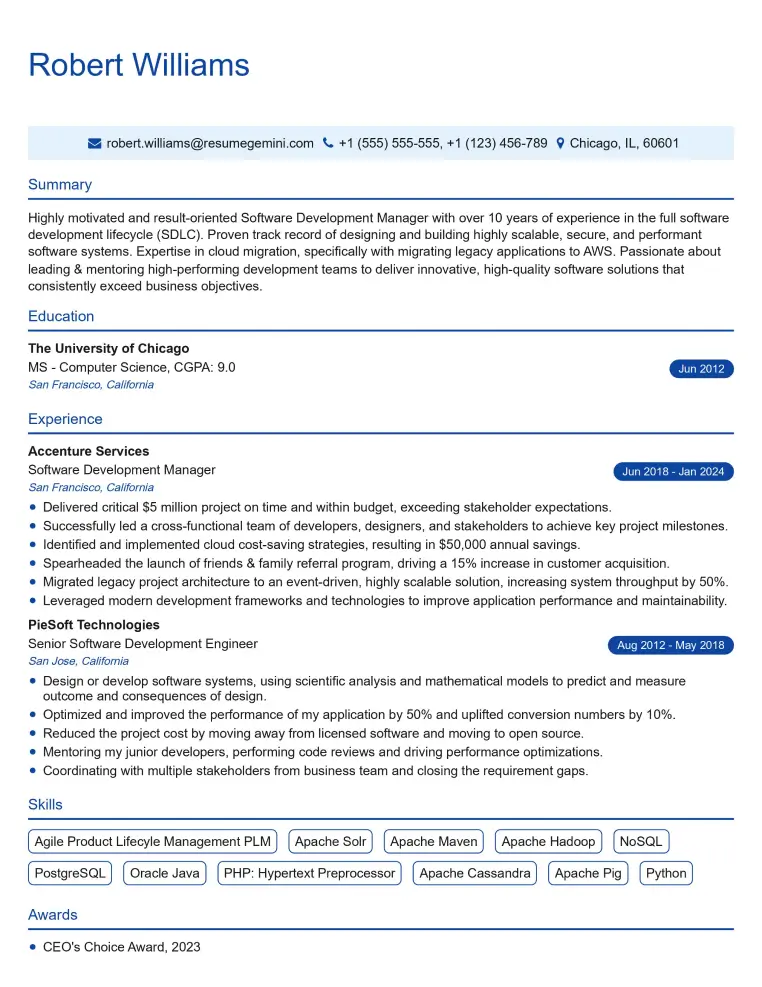
Elevate your job search with our premium resume templates. Here is an amazing resume template that can be used to build a professional and elegant resume. You can build a resume from scratch or revamp your existing resume. Impress hiring managers and secure your next opportunity.
- Top 50 Most Common Interview Questions
- The Psychology of a Great Resume: Hacks to Impress Recruiters
- What Mistakes to Avoid When Writing a Resume: A Comprehensive Guide
- Elevate Your Career with Expert Resume Building: Introducing ResumeGemini
- Crafting Your First Impression: How To Make Free Resume Online For Freshers