





In today’s competitive job market, it’s more important than ever to have a resume that stands out from the crowd. One way to do this is to create an ATS-friendly resume. An ATS, or Applicant Tracking System, is a software program that many companies use to screen resumes. If your resume is not ATS-friendly, it may not even be seen by a human recruiter.
Understanding the Importance of ATS-Friendliness
ATS systems are designed to quickly scan resumes for specific keywords. If your resume does not contain the right keywords, it may be rejected by the ATS. This is why it is important to optimize your resume for keywords.
Choosing the Right Resume Template
The first step to creating an ATS-friendly resume is to choose the right template. There are many different resume templates available online, but not all of them are created equal. Some templates are more ATS-friendly than others. When choosing a template, look for one that is simple and easy to read. Avoid using templates with too many graphics or fonts. These can make it difficult for the ATS to read your resume.
Optimizing Your Resume for Keywords
Once you have chosen a template, you need to optimize your resume for keywords. The best way to do this is to identify the keywords that are most relevant to the job you are applying for. You can find keywords by reading the job description and identifying the skills and qualifications that the employer is looking for. Once you have identified the keywords, you need to incorporate them into your resume. You can do this by using them in your resume summary, skills section, and work experience section.
Formatting for ATS Compatibility
In addition to using keywords, you also need to format your resume for ATS compatibility. This means using a standard font, such as Arial or Times New Roman. You should also use a consistent font size and style throughout your resume. Avoid using italics, bold, or underlining. These can make it difficult for the ATS to read your resume.
Customizing Your Resume to Match the Job
Once you have optimized your resume for keywords and formatting, you need to customize it to match the job you are applying for. This means highlighting the skills and qualifications that are most relevant to the job. You can do this by using different keywords in your resume summary and skills section. You can also tailor your work experience section to highlight the experiences that are most relevant to the job.
Proofreading and Editing for Perfection
Once you have finished customizing your resume, it is important to proofread and edit it carefully. Make sure there are no errors in grammar or spelling. You should also make sure that your resume is well-organized and easy to read.
Additional Tips for Enhancing Your Resume
In addition to the tips above, there are a few other things you can do to enhance your resume.
- Use a strong resume headline.
- Write a clear and concise resume summary.
- Highlight your skills and qualifications.
- Use action verbs to describe your work experience.
- Quantify your accomplishments.
- Use a professional font.
- Use a consistent font size and style.
- Avoid using italics, bold, or underlining.
- Use white space to make your resume easy to read.
Best Practices for Sending Your ATS-Optimized Resume
Once you have created an ATS-optimized resume, it is important to send it to employers in the right way. Here are a few best practices for sending your resume:
- Use a professional email address.
- Send your resume in a PDF format.
- Name your resume file using a standard format, such as “FirstName_LastName_Resume”.
- Include a cover letter that highlights your skills and qualifications.
- Follow up with employers after you have submitted your resume.
By following these tips, you can create an ATS-friendly resume that will help you land your dream job.
For more help with creating an ATS-friendly resume, visit ResumeGemini.
Career Expert Tips:
- Select the ideal resume template to showcase your professional experience effectively.
- Master the art of resume writing to highlight your unique qualifications and achievements.
- Checkout the resume writing tips for guidance and best practices.
- Make your 2025 brighter with a new job. Build a powerful resume with ResumeGemini and save big, enjoy exclusive discounts on premium templates.
Frequently Asked Questions (FAQs)
Question 1: What is an ATS and how does it work?
An Applicant Tracking System (ATS) is a software used by companies to automate the process of receiving, screening, and organizing job applications. When a job seeker submits their resume through an online job portal or company website, it is typically scanned by an ATS to determine if it matches the requirements of the job description. This screening process helps recruiters quickly identify qualified candidates and shortlist them for further consideration.
Question 2: How can I make sure my resume is ATS-friendly?
To make your resume ATS-friendly, consider the following tips:
- Use relevant keywords: Carefully review the job description and identify keywords that describe the skills, experiences, and qualifications required for the role. Incorporate these keywords throughout your resume, especially in the summary, skills section, and work experience descriptions.
- Use a clear and concise format: ATSs prefer resumes that are well-structured and easy to navigate. Use headings, subheadings, and bullet points to organize your information logically. Avoid using fancy fonts, graphics, or images that may interfere with the ATS’s scanning process.
- Use standard file formats: Save your resume in a standard file format such as PDF or Word document (.docx). Avoid using unusual file formats or compressed files, as they may not be compatible with all ATSs.
Question 3: What are the key components of a successful ATS-optimized resume?
A successful ATS-optimized resume typically includes the following key components:
- Contact information: Ensure your name, email address, phone number, and LinkedIn profile URL are prominently displayed and easy to find.
- Summary: Craft a concise and compelling summary that highlights your most relevant skills, experiences, and career goals. Use keywords from the job description to increase your visibility to ATSs.
- Skills: List your technical and soft skills in a dedicated skills section. Use a mix of hard skills (e.g., software proficiency, programming languages) and soft skills (e.g., communication, teamwork, problem-solving).
- Work experience: Describe your work experience in reverse chronological order, starting with your most recent role. Quantify your accomplishments using specific metrics and highlight the impact of your contributions.
- Education: List your educational background, including your degrees, certifications, and any relevant coursework or training.
Question 4: How do I choose the right resume template?
When choosing a resume template, consider the following factors:
- Industry and job level: Different industries and job levels may have specific resume formatting preferences. Research industry norms and choose a template that aligns with the expectations of your target audience.
- Personal style: Choose a template that reflects your personal style and career brand. Consider your desired career path and the image you want to project to potential employers.
- ATS compatibility: Ensure that the template you choose is ATS-friendly and will not interfere with the scanning process. Look for templates specifically designed to be compatible with ATSs.
Question 5: How can I optimize my resume for keywords?
To optimize your resume for keywords, incorporate relevant keywords throughout your resume, including:
- Job title and industry keywords: Use keywords that describe your target job title and industry.
- Skill keywords: Include a list of relevant hard and soft skills that match the job description.
- Company and project keywords: Highlight keywords related to the companies you have worked for and the projects you have been involved in.
Question 6: What are the common mistakes to avoid when writing an ATS-optimized resume?
Common mistakes to avoid when writing an ATS-optimized resume include:
- Using excessive formatting: Avoid using excessive formatting, such as tables, charts, or graphics, as these can interfere with the ATS’s scanning process.
- Including personal information: Do not include personal information, such as your age, marital status, or hobbies, on your resume.
- Submitting a generic resume: Tailor your resume to each specific job application by highlighting the skills and experiences that are most relevant to the role.
- Using passive language: Use active and concise language to describe your accomplishments and contributions.
Question 7: How can I customize my resume to match specific job descriptions?
To customize your resume to match specific job descriptions, consider the following tips:
- Read the job description carefully: Identify the key skills, experiences, and qualifications required for the role.
- Highlight relevant skills and experiences: Emphasize the skills and experiences that are most closely aligned with the job description.
- Use specific examples: Provide specific examples of your accomplishments and contributions to demonstrate your value.
- Tailor your resume to each application: Customize your resume for each specific job application to increase your chances of being shortlisted.
Question 8: Do I need to include references in my ATS-optimized resume?
Including references in your ATS-optimized resume is generally not necessary. ATSs are designed to scan and extract relevant information from your resume, and references are not typically required at the initial screening stage. However, you may consider including a statement at the end of your resume indicating that references are available upon request.
Next Step:
You’ve learned the key elements of crafting an ATS-approved resume that will increase your chances of landing your dream job. Now it’s time to put your knowledge into action! Head over to ResumeGemini and let our premium, ATS-friendly resume builder guide you through the process. With customizable templates and expert tips, creating a standout resume that will impress hiring managers has never been easier. Don’t wait—get started today and unlock your career potential!
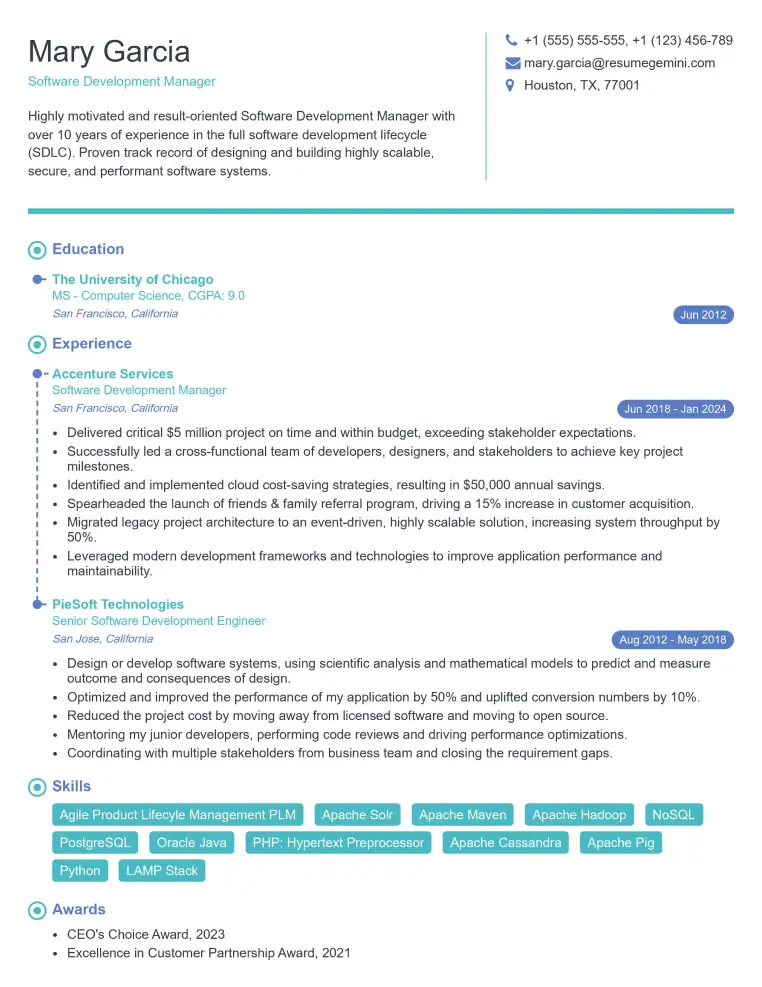
Elevate your job search with our premium resume templates. Here is an amazing resume template that can be used to build a professional and elegant resume. You can build a resume from scratch or revamp your existing resume. Impress hiring managers and secure your next opportunity.
- Top 50 Most Common Interview Questions
- The Psychology of a Great Resume: Hacks to Impress Recruiters
- What Mistakes to Avoid When Writing a Resume: A Comprehensive Guide
- Elevate Your Career with Expert Resume Building: Introducing ResumeGemini
- Crafting Your First Impression: How To Make Free Resume Online For Freshers