





The job hunt can be a daunting task, but it doesn’t have to be. With the right tools and guidance, you can create a winning resume that will help you stand out from the competition and land your dream job.
Create a Professional Resume in Minutes
ResumeGemini’s user-friendly resume builder makes it easy to create a professional resume in minutes. Simply choose from our library of professionally designed templates, fill in your information, and download your resume in PDF format. It’s that simple!
Access 3.6 Million+ Content Examples
Not sure what to include on your resume? ResumeGemini has you covered! Our extensive database of 3.6 million+ content examples provides you with real-world examples of how to write a strong resume. Simply browse our examples by industry, job title, or skill, and add the content that best fits your needs.
Choose from ATS-friendly Templates
Applicant Tracking Systems (ATS) are software programs that many companies use to screen resumes. If your resume is not ATS-friendly, it may never be seen by a human recruiter. ResumeGemini’s templates are all ATS-friendly, so you can be sure that your resume will be seen by the people who matter.
Here are some tips for making sure your resume is ATS-friendly:
- Use a simple, easy-to-read font.
- Avoid using graphics or images.
- Use keywords throughout your resume.
- Proofread your resume carefully for any errors.
Build a Resume That Passes Applicant Tracking Systems (ATS)
In addition to using ATS-friendly templates, there are a few other things you can do to make sure your resume passes ATS. Here are a few tips:
- Use a strong action verb in each bullet point.
- Quantify your accomplishments whenever possible.
- Use keywords throughout your resume.
- Tailor your resume to each job you apply for.
Preview and Personalize Your Resume
Once you’ve created your resume, you can preview it online or download it in PDF format. You can also personalize your resume by adding your own branding, colors, and fonts.
Download Your Resume in PDF Format
When you’re finished creating your resume, you can download it in PDF format. PDF is the standard file format for resumes, and it will ensure that your resume looks the same on any computer.
Additional Tips for Writing a Strong Resume
In addition to using ResumeGemini’s resume builder, here are a few additional tips for writing a strong resume:
- Keep your resume concise. One page is ideal for most resumes.
- Highlight your most relevant skills and experience.
- Proofread your resume carefully for any errors.
- Get feedback from a friend or family member.
With ResumeGemini’s free resume builder, you can easily create a professional, ATS-friendly resume that will help you land your dream job. So what are you waiting for? Get started today!
Visit ResumeGemini to start building your resume now.
Career Expert Tips:
- Select the ideal resume template to showcase your professional experience effectively.
- Master the art of resume writing to highlight your unique qualifications and achievements.
- Checkout the resume writing tips for guidance and best practices.
- Make your 2025 brighter with a new job. Build a powerful resume with ResumeGemini and save big, enjoy exclusive discounts on premium templates.
Frequently Asked Questions (FAQ’s)
How can I create a resume for free?
ResumeGemini’s user-friendly resume builder is available at no cost. Simply visit their website, select a template, and start crafting your resume. The step-by-step guide and vast library of content examples empower you to create a professional and effective resume.
What types of templates are available?
ResumeGemini offers a diverse range of templates to suit various industries and preferences. With 12 unique templates, each featuring 5 color themes, you have 60 stunning options to choose from. These templates are designed to highlight your skills, experience, and accomplishments in the most impactful way.
Can I use ResumeGemini’s builder if I have no experience?
Absolutely! ResumeGemini is designed to be accessible to job seekers of all experience levels. The intuitive interface and comprehensive content examples guide you through each step of the resume-building process. Even if you’re creating your first resume, you can effortlessly craft a professional and impactful document.
How do I ensure my resume will pass ATS?
ResumeGemini’s templates are meticulously designed to be ATS-friendly, maximizing your chances of passing automated screening systems. The builder employs industry-standard keywords and formatting to ensure your resume is easily parsed by ATS software. Additionally, ResumeGemini provides guidance on tailoring your resume to specific job descriptions, further enhancing your chances of success.
Can I preview my resume before downloading it?
Yes, ResumeGemini allows you to preview your resume before downloading it. Once you’ve completed your resume, simply click the “Preview” button to view a live rendering of your document. This feature enables you to make any necessary adjustments before finalizing your resume.
What file formats can I download my resume in?
ResumeGemini offers multiple file formats to suit your needs. You can download your resume in PDF, Word, or Text format. The PDF format is widely accepted by employers and compatible with most devices, while the Word format allows for easy editing and customization. The Text format is suitable for situations where formatting is not crucial.
Next Step:
Unlock your career potential with ResumeGemini’s free resume builder. Experience the ease and efficiency of creating a professional and ATS-friendly resume that will elevate your job applications. Visit ResumeGemini today to start building your dream resume.
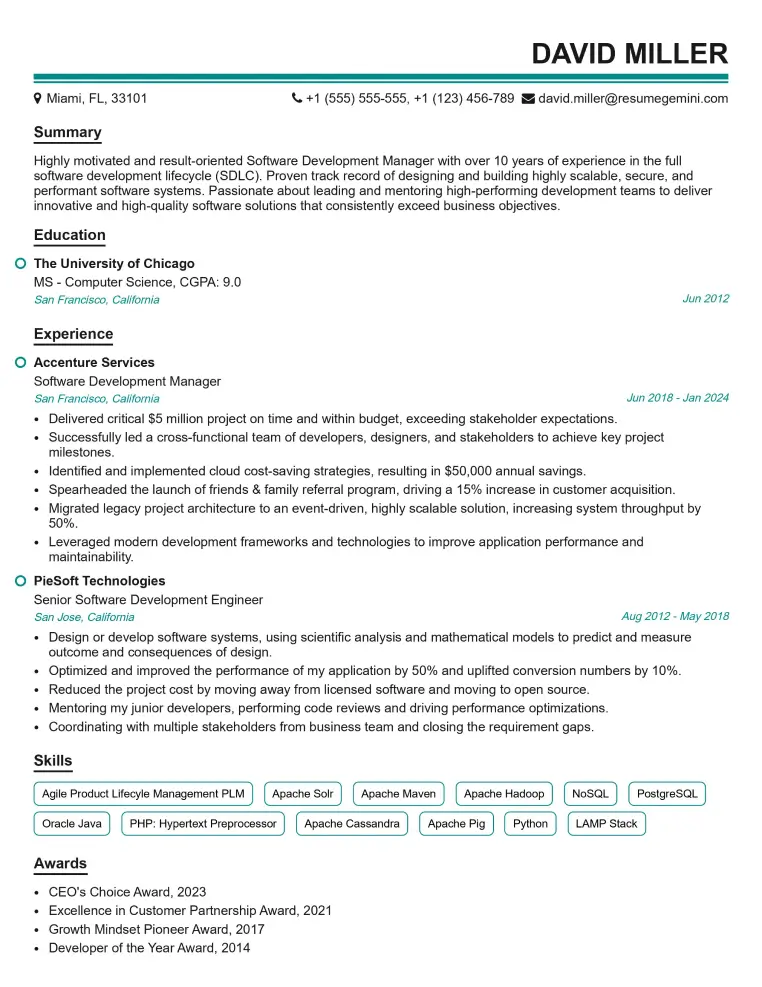
Elevate your job search with our premium resume templates. Here is an amazing resume template that can be used to build a professional and elegant resume. You can build a resume from scratch or revamp your existing resume. Impress hiring managers and secure your next opportunity.
- Top 50 Most Common Interview Questions
- The Psychology of a Great Resume: Hacks to Impress Recruiters
- What Mistakes to Avoid When Writing a Resume: A Comprehensive Guide
- Elevate Your Career with Expert Resume Building: Introducing ResumeGemini
- How to Write a Resume Using Google Gemini: Step-by-Step Guide