





“A killer resume is the foundation of a successful job search.” – ResumeGemini
In today’s competitive job market, it’s crucial to stand out from the crowd. A well-crafted resume is your chance to showcase your skills, experience, and accomplishments, making a strong impression on potential employers. But before you dive into writing your resume, it’s essential to choose the right tool for the job: a resume builder or a template.
Let’s delve into the pros and cons of each to help you make an informed decision and ace your 2026 job search.
Resume Builders: Power and Convenience
Resume builders offer a structured and user-friendly approach to resume creation. These online platforms guide you through a step-by-step process, providing predefined sections and templates that align with industry best practices. They often include a database of customizable content, helping you tailor your resume to specific job requirements.
Advantages of Resume Builders:
- Simplicity and Guidance: Resume builders provide a clear and intuitive interface, making it easy for anyone to create a professional-looking resume, even without prior experience.
- Predefined Structure and Content: They offer well-defined sections that adhere to industry standards, ensuring your resume is organized and easy to read. Additionally, they provide sample text and content suggestions, helping you highlight your skills and accomplishments.
- ATS Optimization: Many resume builders integrate Applicant Tracking System (ATS) compatibility, increasing your chances of getting noticed by automated resume screening software.
- Collaboration and Feedback: Some resume builders allow for collaboration and feedback sharing, enabling you to get valuable input from recruiters or career counselors.
Disadvantages of Resume Builders:
- Limited Customization: While resume builders provide predefined templates and content, they may limit your ability to fully customize the design and layout to match your personal brand.
- Potential for Homogeneity: Since resume builders use pre-built templates, your resume may risk looking similar to others, reducing your chances of standing out.
- Cost: Some resume builders offer premium plans with additional features, which may require a paid subscription.
Resume Templates: Flexibility and Control
Resume templates, on the other hand, provide a more flexible and creative approach to resume writing. They serve as pre-designed frameworks that you can modify and personalize to create a visually appealing and tailored resume that reflects your unique style and experience.
Benefits of Resume Templates:
- Complete Customization: Resume templates give you complete freedom to customize every aspect of your resume, from design and layout to font and colors, allowing you to create a truly unique and memorable document.
- Visual Appeal: Templates enable you to showcase your creativity and make a strong visual impact, increasing your chances of capturing the attention of recruiters.
- Flexibility and Control: You have full control over the formatting, sections, and content of your resume, allowing you to tailor it precisely to the specific requirements of each job application.
Limitations of Resume Templates:
- Skill Requirement: Working with resume templates requires some level of design and formatting skills to achieve a polished and professional-looking result.
- Time-Consuming: Creating a resume from scratch using a template can be time-consuming, especially if you’re starting from a blank document.
- ATS Compatibility: Not all resume templates are ATS-optimized, so it’s important to choose a template that meets industry standards.
- Cost: Depending on the source, resume templates can range from free to premium options, with paid templates offering more advanced features and designs.
Matching Your Needs to the Right Resume Creation Tool
The choice between a resume builder and a template depends on your individual needs, skills, and the level of customization you desire. Here are some factors to consider:
- Experience Level: If you’re a recent graduate or have limited experience in resume writing, a resume builder may provide a structured and guided approach.
- Industry and Job Requirements: Consider the industry you’re targeting and the specific job requirements. Some industries may prefer more traditional resume formats, while others may encourage creativity and visual appeal.
- Skills and Expertise: If you have strong graphic design skills and enjoy customizing your resume, a resume template may give you more flexibility to showcase your unique style.
- Time Constraints: If you’re pressed for time, a resume builder can quickly generate a professional-looking resume with minimal effort.
Enhanced Features of Resume Creation Tools
Both resume builders and templates offer enhanced features to elevate your resume writing experience.
- Skill Builders: Some resume builders incorporate skill-building tools that suggest relevant skills based on your experience and industry, helping you identify and highlight your key strengths.
- Keyword Optimization: Advanced resume builders analyze job descriptions and suggest keywords to include in your resume, increasing your chances of passing ATS screening.
- Formatting Options: Both resume builders and templates provide a range of formatting options, such as fonts, colors, and layouts, enabling you to create a visually appealing and readable resume.
- Cover Letter Builder: Many resume builders also include a cover letter builder, ensuring consistency between your resume and cover letter.
Cost and Value Comparison: Free vs. Premium Options
Resume builders and templates can range from free to premium options, depending on the features and services offered. Consider your budget and the value you expect to gain from the tool.
Free Resume Creation Options:
- Google Docs: Google Docs offers basic resume templates that are free and easy to use, making them a suitable option for beginners or those on a tight budget.
- Microsoft Word: Microsoft Word also provides a collection of free resume templates with various designs and layouts, allowing you to create a professional-looking resume.
Premium Resume Creation Options:
- ResumeGemini: ResumeGemini offers premium templates and builder tools, including ATS optimization, collaboration features, and a vast database of customizable content.
- LinkedIn Resume Builder: LinkedIn’s built-in resume builder integrates with your LinkedIn profile, making it easy to import your information and create a professional resume.
- Canva: Canva offers a wide range of creative resume templates, catering to those seeking a visually appealing and unique resume design.
Ultimately, the best resume creation tool for you depends on your specific needs and preferences. Whether you choose a resume builder for guidance and ease of use or a resume template for complete customization and control, remember that the content and quality of your resume are paramount. Take the time to carefully craft your resume, highlighting your skills, experience, and accomplishments, and make a lasting impression on potential employers.
Career Expert Tips:
- Select the ideal resume template to showcase your professional experience effectively.
- Master the art of resume writing to highlight your unique qualifications and achievements.
- Checkout the resume writing tips for guidance and best practices.
- Make your 2025 brighter with a new job. Build a powerful resume with ResumeGemini and save big, enjoy exclusive discounts on premium templates.
Frequently Asked Questions (FAQ’s)
What is the difference between a resume builder and a template?
Resume Builder:
An online tool that guides you through the resume creation process step-by-step, providing templates, content examples, and formatting options. It helps you create a resume quickly and easily, even if you don’t have any prior experience.
Resume Template:
A pre-designed resume layout that you can customize with your information. It provides a basic structure and design elements, but you need to manually input your content and format it yourself.
Which is better for recent graduates: a resume builder or a template?
For recent graduates with limited work experience, a resume builder is generally a better choice. It provides guidance on what to include and how to highlight your skills and education, making it easier to create a strong resume without prior experience.
Example:
ResumeGemini’s Student Resume Template offers specific guidance and content examples for students and recent graduates.
Can I use a resume builder to create a tailored resume for a specific job application?
Yes, a good resume builder should allow you to customize your resume for each job application. It should provide options to adjust the content, format, and design to match the specific requirements of the job you’re applying for.
Tip:
Use keywords from the job description in your resume to make it relevant and tailored to the role you’re applying for.
Are there any free resume builders or templates available?
Yes, there are several free resume builders and templates available online. However, they may offer limited features, templates, and content examples compared to paid services.
Recommendation:
While free options can be helpful, consider investing in a paid resume builder like ResumeGemini for more customization options, professional templates, and ATS-friendly formatting to increase your chances of landing your dream job.
How do I choose the best resume builder or template for my needs?
Consider the following factors when choosing a resume builder or template:
- Industry and Experience Level: Choose a builder or template designed specifically for your industry and career stage.
- Features and Customization: Look for a builder or template that provides the features and customization options you need, such as ATS-friendly formatting, pre-written content examples, and a variety of templates.
- Price and Value: Consider the cost and value of the service. Free options may be limited, while paid services may offer more features and support.
Can I switch between resume builders and templates as needed?
Yes, you can switch between resume builders and templates as needed. However, it’s important to note that different builders and templates may have different formatting and content requirements. Be sure to carefully review the instructions and make any necessary adjustments when switching between them.
Next Step:
Now that you have a clear understanding of the differences between resume builders and templates, it’s time to choose the right tool for your needs. If you’re looking for a guided, step-by-step approach with tailored content and formatting, a resume builder like ResumeGemini is an excellent choice. With its extensive library of templates, pre-written content examples, and ATS-optimized formatting, you can create a professional, eye-catching resume that will help you stand out in the job market.
Don’t let a subpar resume hold you back from getting the job you deserve. Take control of your job search and create a resume that will make a lasting impression. Start building your winning resume today with ResumeGemini!
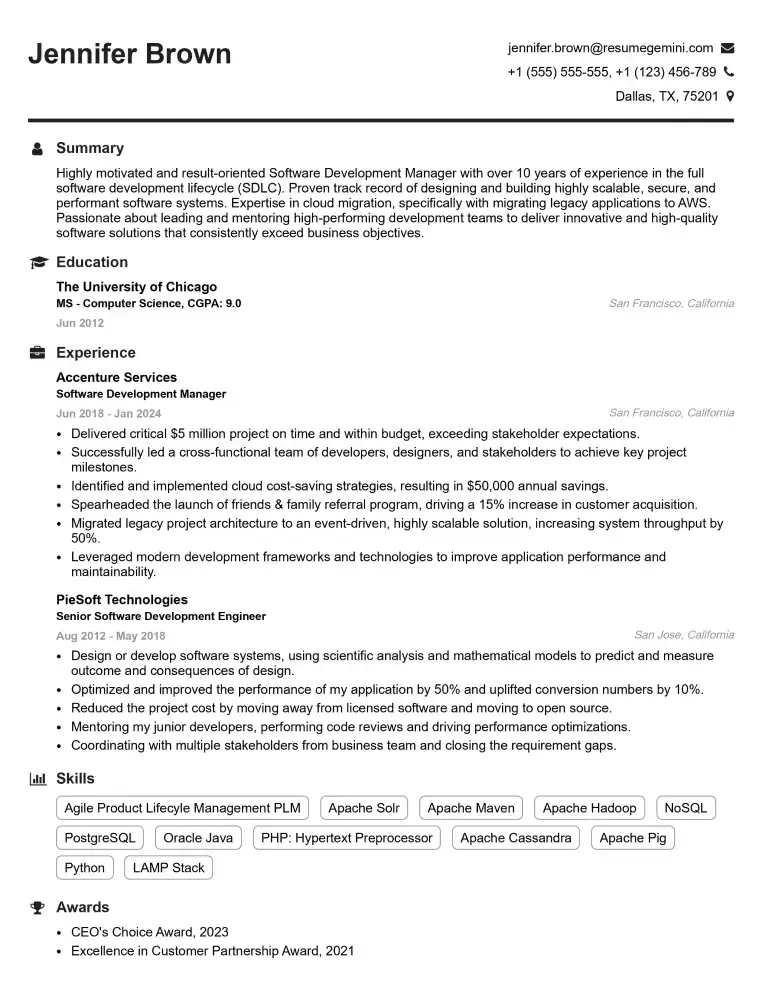
Elevate your job search with our premium resume templates. Here is an amazing resume template that can be used to build a professional and elegant resume. You can build a resume from scratch or revamp your existing resume. Impress hiring managers and secure your next opportunity.
- Top 50 Most Common Interview Questions
- The Psychology of a Great Resume: Hacks to Impress Recruiters
- What Mistakes to Avoid When Writing a Resume: A Comprehensive Guide
- Elevate Your Career with Expert Resume Building: Introducing ResumeGemini
- Crafting Your First Impression: How To Make Free Resume Online For Freshers